

Stop Wrestling with Themes: A Developer’s Guide to Choosing a CMS
Stop Wrestling with Themes: A Developer’s Guide to Choosing a CMS
Why Choosing the Right CMS for Developers Matters in 2026
Finding the right cms for developers is the difference between building a fast, scalable web application and wrestling with a brittle, slow legacy system. If you want to bypass the bloat, you need a system that prioritizes API-first design, code-first schemas, and seamless frontend integrations.
Here is a quick look at how the top developer-friendly CMS options stack up in July 2026:
- Best Open-Source Headless: Strapi (highly customizable, JavaScript/TypeScript native, with over 72,000 GitHub stars).
- Best Code-First Next.js CMS: Payload (Next.js native, schema-as-code, handles database migrations automatically).
- Best React-Centric CMS: Sanity (voted #1 for React, stores rich text as clean JSON instead of HTML).
- Best Hybrid Option: ApostropheCMS (combines headless APIs with visual, on-page editing and has over 4,500 GitHub stars).
Most traditional content management systems are built for non-technical users. They bundle heavy backend code with rigid, pre-packaged themes. This introduces massive code bloat, slows down page load speeds, and actively hurts your search engine rankings.
Modern developers do not want to click around a graphical interface to build a database. They want to define schemas in code, track changes in Git, and query content using GraphQL or REST APIs. The modern web requires a clean separation of concerns.
I’m Gianna Heron, founder of Herow Marketing, and my background in both Wall Street finance and creative branding helps me evaluate the technical and business ROI of choosing a cms for developers. We focus on building high-performance websites that eliminate technical debt so your business can scale without constant code rewrites.
Simple guide to cms for developers terms:
Key Evaluation Criteria and Architecture for a Modern CMS for Developers
When evaluating a cms for developers, we have to move past basic feature lists. A developer-friendly platform must be judged on its architectural integrity, performance, and how well it integrates into modern engineering workflows.
First and foremost is developer freedom. If a CMS forces you into a specific templating language or restricts how you structure your database, it will eventually become a bottleneck. We look for platforms that offer complete customization control over the data model, API endpoints, and server-side logic. You should be able to define your content schema and let the system handle the rest, without wrestling with rigid, pre-packaged core code.
Performance is another non-negotiable metric. In July 2026, user experience and search engine visibility are deeply intertwined. If your CMS architecture introduces code bloat, your page speed drops, directly hurting your Core Web Vitals. To understand how performance and search rankings are linked, check out our guide on Why SEO-Driven Web Development Is Your Secret Weapon. A lightweight CMS architecture acts like a well-tuned sports car, whereas a bloated legacy system is like a vehicle carrying far too much weight, creeping along slowly under the load of unnecessary plugins.
Finally, we must prioritize API-first design. Whether you are querying data for a static site, a mobile app, or an internal portal, the content should be delivered seamlessly via highly optimized REST or GraphQL endpoints. The database layer must remain decoupled from how the content is eventually rendered.
Headless vs. Traditional Architecture
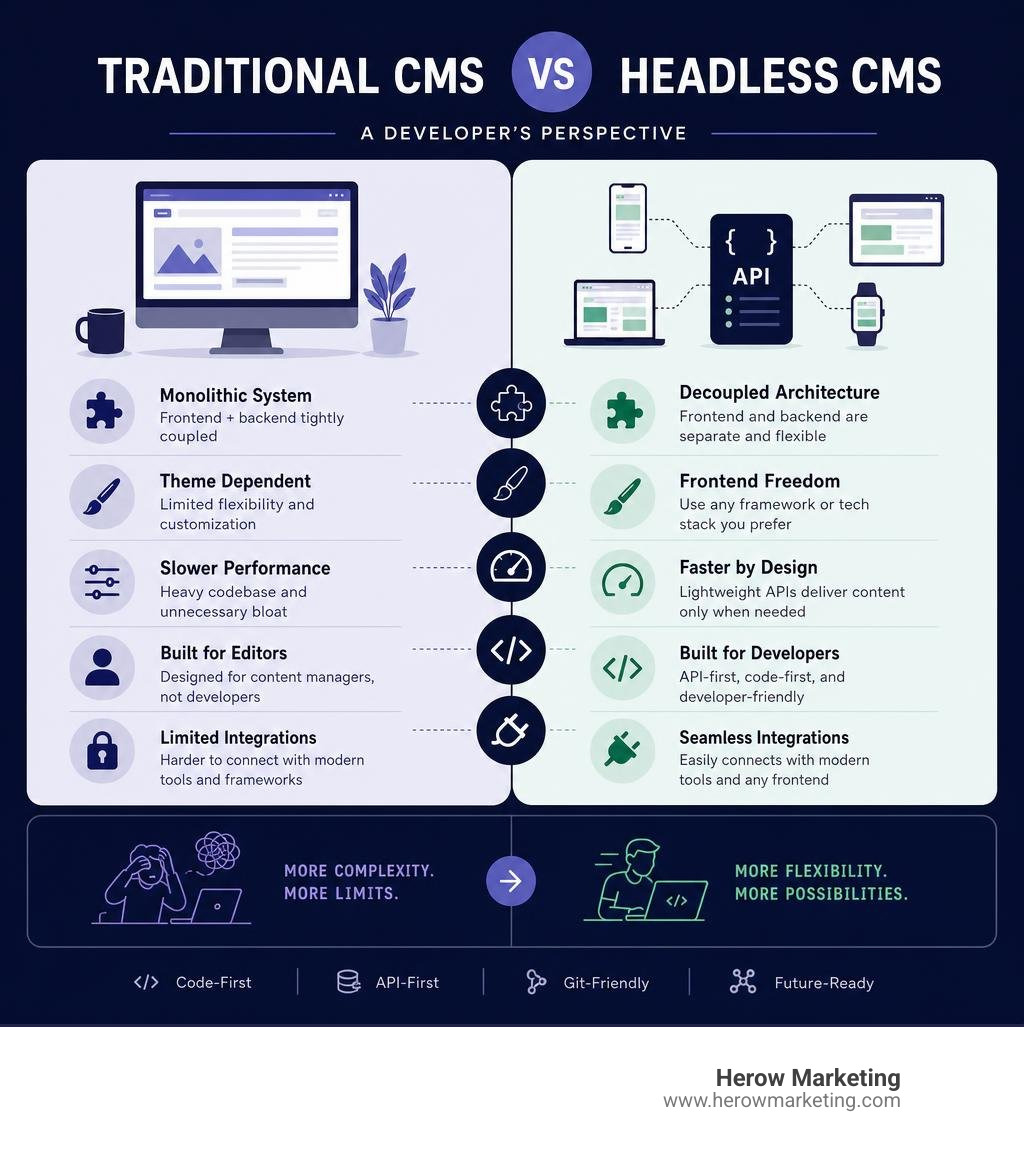
To understand why developers are moving away from traditional setups, we have to look at how these systems are structured. A traditional CMS couples the backend content repository (the Content Management Application, or CMA) directly with the frontend presentation layer (the Content Delivery Application, or CDA). This monolithic approach means that database queries, server-side page rendering, and client-side styling are all handled by the same system.
While this makes setup easy for non-technical users, it is a nightmare for developers trying to build custom applications. It forces you to use the platform’s specific templating engine, limits your choice of frontend frameworks, and bundles excessive backend code into the user-facing site.
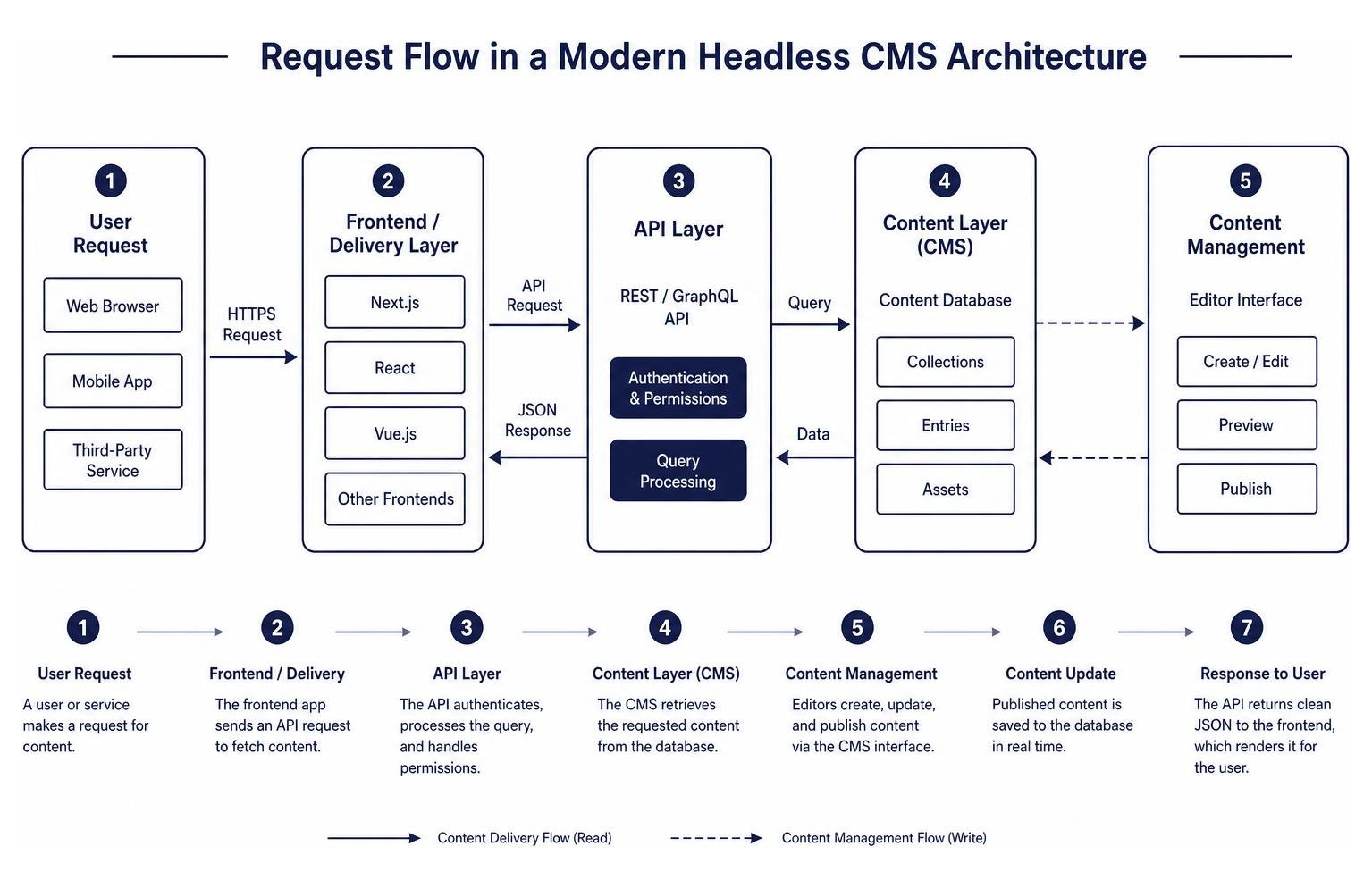
A headless CMS, by contrast, removes the frontend “head” entirely. The CMS serves solely as a structured content database and editing interface. Content is stored as raw data and delivered as clean JSON via APIs. This decoupled architecture gives you complete freedom to build your frontend using modern frameworks like React, Next.js, or Vue.js. Because the user-facing site is completely separate from the heavy backend administrative code, you eliminate code bloat, improve security, and dramatically boost loading speeds. To learn how this architectural separation directly impacts your search visibility, read our deep dive on Web Development SEO Integration Stop Playing Hide and Seek with Rankings.
Developer Experience and Tooling
A CMS can have the most advanced API in the world, but if the developer experience (DX) is frustrating, your team’s productivity will plummet. Modern developers need tools that fit into their existing local development environments and version control pipelines.
We look for platforms that offer robust Command Line Interface (CLI) tools. A developer should be able to spin up a new CMS instance, configure local database connections, and run migration scripts directly from the terminal. Local development environments and sandbox environments are crucial; you should never have to test schema changes or new API endpoints on a live production server.
Furthermore, version control integration is a major deciding factor. This is where the concept of “schema-as-code” shines. Instead of logging into a graphical user interface to click and build your database tables, you define your content models directly in your codebase (often using TypeScript or JSON). Because these schemas live in your code, they can be version-controlled in Git alongside your frontend application. When you deploy your code, the CMS automatically reads the updated schema and handles the database migrations behind the scenes. This workflow keeps your environments in perfect parity and ensures that your backend configurations are always reproducible. For a practical look at how professional teams implement these modern workflows, see An Honest Review of Web Development Agency.
The Best CMS for Developers in 2026: Top Platforms Compared
Choosing the right platform requires balancing technical flexibility, hosting preferences, and total cost of ownership. The July 2026 developer landscape offers a rich variety of open-source and proprietary options.

Below is a comparison table outlining how the top developer-friendly CMS platforms perform across critical technical categories:
| CMS Platform | Architecture Type | Schema Definition | Database Options | Primary Language/Stack | Best Suited For |
|---|---|---|---|---|---|
| Strapi | Headless (Open-Source) | Visual Builder / Code | PostgreSQL, MySQL, SQLite | TypeScript / Node.js | Highly customizable APIs, self-hosted projects |
| ApostropheCMS | Hybrid (Open-Source) | Code-First | MongoDB | JavaScript / Node.js | Multi-site enterprise projects with Astro or React |
| Sanity | Headless (Proprietary SaaS) | Schema-as-Code | Sanity Content Lake | JavaScript / React | Structured JSON rich text, real-time collaboration |
| Reverso | Headless (Open-Source) | Front-to-Back (JSX) | SQLite, PostgreSQL | TypeScript / Fastify | Rapid prototyping, React/Next.js projects |
| Enonic XP | Hybrid (Open-Source) | XML / NoSQL Schema | Built-in NoSQL | Java / JavaScript | Content-centric enterprise apps, hybrid delivery |
| Granit.Cms | Headless (Open-Source) | JSON Block Tree | PostgreSQL (jsonb) | .NET / Next.js | High-performance multi-site .NET backends |
For a broader look at the global market, you can also explore the Top 9 Best CMS for Developers in 2026. Let’s dive deeper into these categories to see how they perform in real-world scenarios.
Open-Source Powerhouses: Strapi and ApostropheCMS
Open-source platforms remain the gold standard for developers who demand complete data ownership, self-hosting freedom, and zero vendor lock-in.
Strapi is the absolute heavyweight in this space, sporting over 72,000 stars on GitHub. Built on a 100% JavaScript and TypeScript codebase, it features a highly logical, layered backend architecture where requests flow systematically through Routes, Middlewares, Controllers, and Services. This structured flow makes it incredibly easy to inject custom logic or security checks at any stage of the request lifecycle. Strapi is database-agnostic, supporting PostgreSQL, MySQL, SQLite, and MariaDB. While they offer a managed cloud service, the self-hosted community edition remains completely free, keeping your total cost of ownership incredibly low. To explore the codebase or contribute, visit the strapi/strapi repository on GitHub.
ApostropheCMS takes a unique hybrid approach, bridging the gap between headless flexibility and on-page visual editing. With over 4,500 stars on GitHub, this Node.js and MongoDB-driven platform is designed to scale beautifully from simple websites to massive enterprise applications handling millions of pages. What makes ApostropheCMS stand out is its native integration with modern frontend frameworks like Astro (via pre-configured starter kits like Apollo and Essentials). These starter kits handle content fetching automatically, meaning you do not have to write manual REST API calls to populate your pages. It is an exceptional choice for organizations that need multi-site management and automated translations from a single dashboard. Check out their official repository at apostrophecms/apostrophe to get started.
React-Centric and Code-First CMS for Developers
If your engineering team is heavily invested in the React and Next.js ecosystem, you should look closely at platforms designed specifically to leverage these technologies.
Sanity is widely voted by developers as the premier React CMS. Instead of forcing you to build schemas in a database GUI, Sanity treats your schema entirely as code. You write your content models in JavaScript, and they are compiled into an incredibly responsive editing interface. A major architectural advantage of Sanity is that it treats rich text entirely as structured JSON (using Portable Text) rather than raw HTML. This makes it incredibly easy to clean, query, and reuse content across multiple channels, including mobile apps and smart devices, without dealing with messy HTML parsing. To see how it integrates with your React application, check out The Best React CMS for Developers | Sanity.
On the cutting edge of code-first development is Reverso, an open-source headless CMS that completely reverses the traditional workflow. Instead of building a backend database and then writing frontend code to query it, Reverso uses a “front-to-back” paradigm. You simply write your standard React or Next.js frontend code and add HTML data attributes (such as data-reverso) to your JSX elements. When you run the development server, Reverso scans your frontend code, auto-generates the backend database schema, handles the migrations, and builds a fully featured admin panel automatically. It is powered by Node.js, Fastify, and Drizzle ORM, offering exceptional performance and native TypeScript support. It serves as a modern, high-speed replacement for legacy setups like WordPress combined with Advanced Custom Fields (ACF). You can inspect the source code and installation guides on the hogrid/reverso repository.
Enterprise and Hybrid CMS for Developers
For large-scale enterprise environments, you often need robust security, strict multi-site tenant isolation, and deep backend integration capabilities.
Enonic XP is an open-source, hybrid platform that separates content from presentation by being completely content-centric rather than page-centric. Built on a NoSQL document storage engine, it provides a direct 1:1 mapping between your developer-defined schema fields and the underlying database properties. A key highlight of Enonic XP is its “X-Data” system, which allows developers to dynamically inject shared fields (such as SEO metadata or tracking scripts) across multiple different content types without having to redefine them manually. It allows you to build a hybrid environment where editors can visually compose pages while you query the exact same data headlessly via their GraphQL API. Learn more on the Content Management System – Enonic Developer Portal.
If your stack is built on Microsoft technologies, Granit.Cms is a highly optimized, block-based headless content backend designed specifically for .NET and Next.js App Router applications. Architecturally, Granit.Cms stores its entire block tree as opaque JSON (using jsonb in PostgreSQL). This allows your frontend renderer and backend schema to evolve completely independently without requiring constant database schema updates. It also features a highly robust security model, separating SiteId (as a multi-site discriminator) and TenantId (as a GDPR compliance boundary) at the database layer. This ensures absolute data isolation and compliance across complex corporate networks. Read more about its architecture on CMS — a multi-site, block-based content backend | Granit.
Balancing Developer Control with Content Editor Autonomy
A common pitfall when choosing a cms for developers is focusing entirely on the engineering experience while ignoring the people who will actually use the platform daily: your content editors and marketing teams.
If your CMS is too developer-centric, content editors will not be able to make simple text updates or upload blog posts without generating a support ticket. This creates a massive bottleneck, dragging developers away from building core features to handle minor content changes.
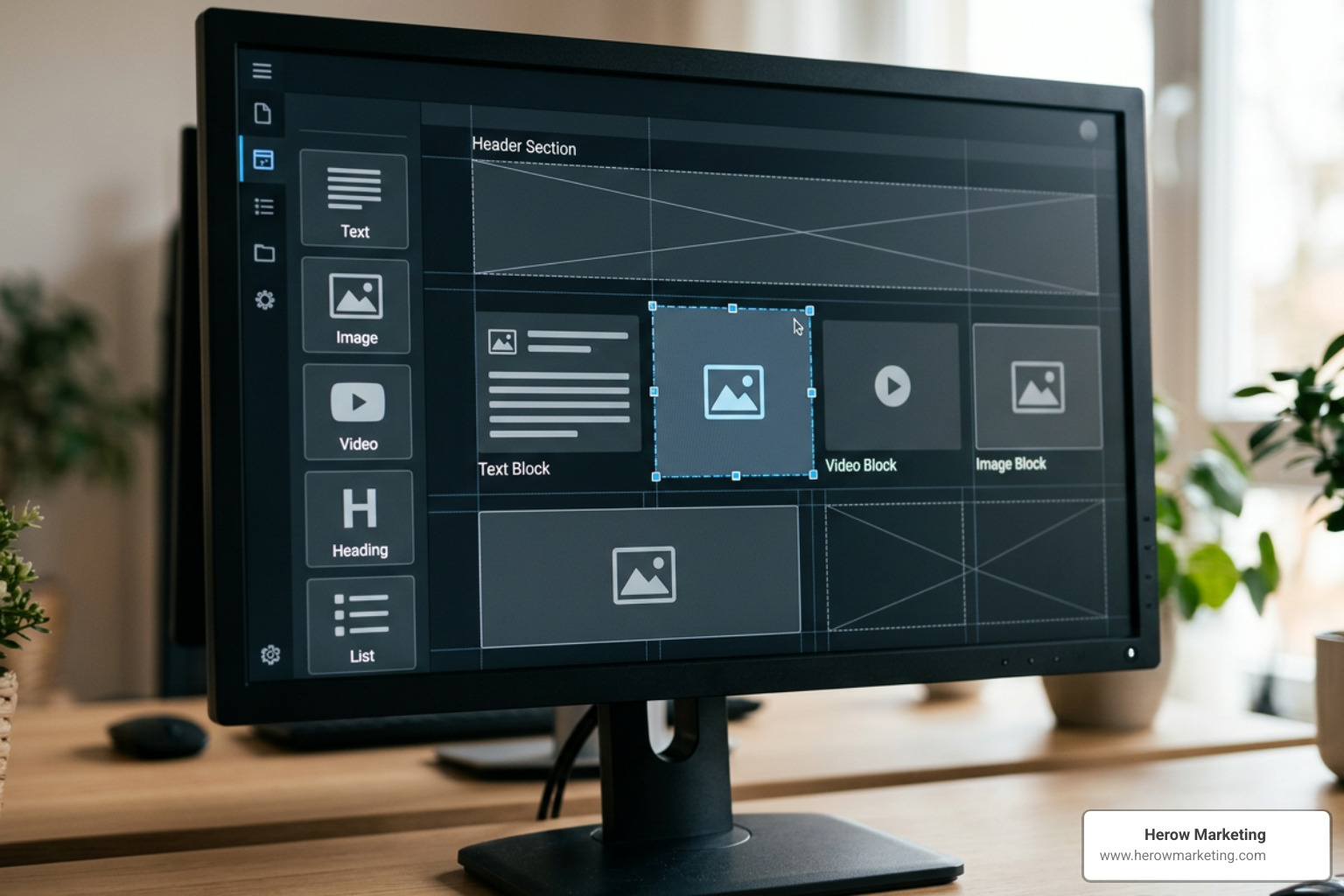
The ideal developer-friendly CMS must balance technical control with marketer independence. This is achieved by building robust “guardrails” within the system. As a developer, you should define the structured content blocks, the styling parameters, and the acceptable data fields. Once those guardrails are in place, the content editors should have complete freedom to write, edit, and arrange those blocks visually using intuitive WYSIWYG editors without breaking the underlying site layout or design system.
When you empower your marketing team to work independently, you eliminate technical debt and free up your engineering resources to focus on high-impact development. To understand how professional CMS development can transform your business workflows, read our guide on Why Your Business Needs Professional CMS Development Services Today.
Frequently Asked Questions about Developer CMS Platforms
What is the difference between a headless CMS and a traditional CMS?
A traditional CMS couples the backend content repository and the frontend presentation layer into a single, monolithic system. A headless CMS completely decouples them. It acts solely as a content database and administrative interface, delivering structured content as raw JSON data via APIs. This allows developers to use any frontend framework they prefer and prevents heavy backend administrative code from bloating the user-facing website.
Why do developers prefer a code-first schema definition?
Code-first schema definition (or “schema-as-code”) allows developers to write their content models directly in their codebase using languages like TypeScript or JSON. This means your database structure can be version-controlled in Git alongside your frontend code, making your environments easily reproducible and eliminating the need to manually click around a graphical database builder to sync local, staging, and production environments.
How does CMS choice impact website performance and SEO?
Traditional monolithic CMS platforms often rely heavily on pre-packaged themes and numerous third-party plugins to add basic functionality. This introduces massive code bloat, slowing down page load times and causing sites to fail search engine performance benchmarks. A modern, headless, or lightweight hybrid CMS delivers only the clean, necessary data, allowing developers to build highly optimized frontends that load instantly and score perfectly on Core Web Vitals, directly boosting organic search rankings.
Conclusion
Choosing a cms for developers is not about finding a single “best” platform; it is about choosing the architecture that best fits your specific technology stack, security requirements, and team workflow. Whether you choose the open-source flexibility of Strapi, the React-native power of Sanity, or the front-to-back automation of Reverso, the goal is always to eliminate technical debt and build a high-performance web presence.
At Herow Marketing, based in Bethlehem, PA, we help businesses architect modern, high-speed web applications. Our strategic playbook combines custom web development with data transparency, providing you with monthly reports to track your site’s performance and organic growth.
Ready to stop wrestling with rigid themes and build a scalable, developer-friendly web presence? Explore our Professional Web Development Services and let’s build something exceptional together.