
How to Manage Facebook Ads Like a Pro
Why Facebook Advertising Management Still Matters in 2026
Facebook advertising management is the process of creating, targeting, optimizing, and scaling paid ad campaigns across Meta’s platforms — including Facebook, Instagram, Messenger, and the Audience Network.
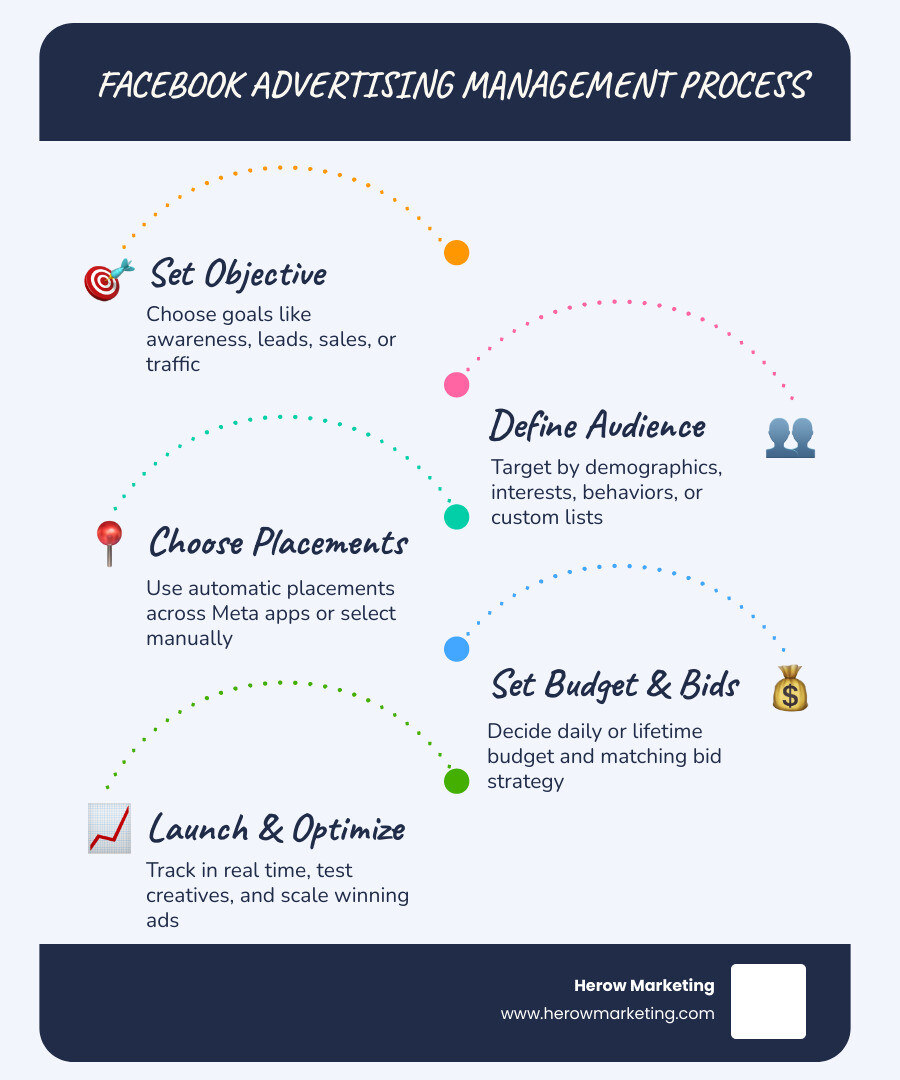
Here’s what effective Facebook ad management involves:
- Set a clear objective — awareness, leads, sales, or traffic
- Define your audience — by demographics, interests, behaviors, or custom lists
- Choose placements — automatic (recommended) or manual across Meta’s apps
- Set your budget — daily or lifetime, with bid strategy to match your goal
- Launch and monitor — track performance in real time and adjust based on data
- Optimize continuously — test creatives, refine audiences, and scale what works
Running ads without a clear system is one of the most common ways small businesses burn through budget with little to show for it. The Meta platform is powerful — case studies have shown brands achieving a 10x increase in sales with the same ad spend, and others recording 220% revenue growth with consistent management. But results like that don’t happen by accident.
The challenge? Meta Ads Manager is a deep, complex tool. Between campaign structure, audience targeting, the learning phase, billing settings, and a growing suite of automation features, it’s easy to feel overwhelmed — especially if marketing isn’t your full-time focus.
That’s exactly what this guide is here to fix.
I’m Gianna Heron, founder of Herow Marketing — my background spans creative direction, brand strategy, and Wall Street-level business planning, all of which I now apply to Facebook advertising management for growth-focused businesses. This guide pulls together everything I’ve learned to help you run smarter, more profitable campaigns.
Facebook advertising management further reading:
Understanding Meta Ads Manager for Facebook Advertising Management
To master facebook advertising management, you first need to understand the tools at your disposal. Many business owners get confused between the different interfaces Meta provides. The primary hub for any serious advertiser is Meta Ads Manager, formerly known as Facebook Ads Manager.
This is the all-in-one tool for creating ads, managing when and where they run, and tracking performance. While it may look intimidating at first, it is the only place where you have full control over your targeting and bidding strategies. It’s significantly more powerful than the “Boost Post” button you see on your Page.
Core Features and Tool Integration
Meta Ads Manager doesn’t live on an island. It integrates with several other tools to form a complete marketing ecosystem:
- Meta Business Suite: Think of this as your “Page Management” hub. It’s where you schedule organic posts, reply to messages, and see basic engagement. While it has some advertising capabilities, it is not a replacement for the full Ads Manager.
- Audience Network: This allows your ads to follow your audience off-Facebook and onto thousands of high-quality websites and mobile apps.
- Messenger and WhatsApp Integration: You can create ads that open directly into a chat, allowing for immediate lead qualification or customer support.
- Real-Time Reporting: The dashboard provides live data, allowing us to see exactly how much we are spending per click or per sale at any given moment.
For a broader look at how these fit into a total strategy, check out our A Comprehensive Guide to Social Media Marketing.
Pros and Cons of the Meta Platform
As of May 2026, the Meta advertising landscape remains the most robust social ad platform in the world, but it isn’t without its hurdles.
The Pros:
- Extensive Reach: With billions of users across Facebook, Instagram, and WhatsApp, your customers are definitely here.
- Precise Targeting: You can target based on everything from “interested in organic dog food” to “likely to move soon.”
- Automated Optimization: Meta’s AI is incredibly good at finding people likely to take action if you give it enough data.
The Cons:
- Learning Curve: The interface changes frequently, and the sheer number of buttons can be overwhelming for beginners.
- Support Limitations: Getting a human on the phone for ad support can be notoriously difficult.
- Privacy Changes: With ongoing updates to mobile tracking (like iOS changes), the platform relies more on its own internal data and API integrations than it used to.
Campaign Setup: Guided vs. Quick Creation
When you click that green “Create” button in Ads Manager, you’ll often be asked how you want to build your campaign. Choosing the right workflow is the first step in professional facebook advertising management.

Choosing Your Creation Method
There are two primary ways to build your ads:
- Guided Creation: This acts as a step-by-step wizard. It’s perfect for beginners or those setting up a complex new objective. It walks you through choosing your goal, defining your audience, and uploading your creative in a logical flow.
- Quick Creation: This is for the “Power Users.” It allows you to create the skeleton of your campaign, ad sets, and ads all at once. It’s great for bulk editing and experienced managers who want to move fast without the hand-holding. This method is the spiritual successor to the old “Power Editor” tool.
Regardless of the method, you must pay close attention to your Ad Creative settings. Ensure your currency and time zone are correct from the start, as these are very difficult (and sometimes impossible) to change later without creating a whole new account.
Strategic Audience Targeting and Placement Selection
The “Who” and “Where” of your ads are just as important as the “What.”
- Custom Audiences: These are your most valuable assets. You can target people who have visited your website, engaged with your Instagram, or are on your email list.
- Lookalike Audiences: Once you have a Custom Audience, you can ask Meta to find “1 million people who look just like my past customers.” This is how you scale.
- Broad Targeting: In 2026, many experts (ourselves included) often recommend “Broad” targeting for certain products. This means letting Meta’s AI find your audience based on who interacts with the ad itself.
- Advantage+ Placements: Meta generally recommends letting their system decide where to show your ad (Feed, Stories, Reels, etc.). While manual placements can be useful for specific creative, automatic placements usually result in a lower cost per result because the algorithm has more flexibility.
Budgeting and Optimization for Maximum ROI
Money management is where many campaigns fail. In facebook advertising management, we have to decide how we want to spend our hard-earned cash.
Scaling Your Facebook Advertising Management Strategy
| Feature | Daily Budget | Lifetime Budget |
|---|---|---|
| Best For | Consistent, ongoing campaigns | Short-term promos or fixed dates |
| Flexibility | Easy to scale up or down daily | Fixed total spend; Meta paces it |
| Control | High control over daily spend | Better for “set it and forget it” promos |
| Optimization | Great for testing new creatives | Good for hitting specific end dates |
To truly scale, we often utilize Campaign Budget Optimization (CBO). Instead of setting budgets for each individual ad set, you set one budget at the top campaign level. Meta then automatically shifts money toward whichever ad set is performing best in real time. This is a key part of driving measurable growth and achieving that 10x sales increase seen in top-tier case studies.
For more on how we report these results to our clients, see The Best Marketing Report Samples for Every Campaign Type.
Navigating the Learning Phase
Every time you launch a new ad or make a “significant edit,” your ad set enters the Learning Phase. This is the period where Meta’s algorithm is testing different people to see who responds to your ad.
- The Goal: You need about 50 “optimization events” (like sales or leads) within a 7-day period to exit the learning phase.
- Learning Limited: If you see this status, it means your budget is too low or your audience is too small to get enough data.
- Hands Off: The biggest mistake you can make is changing your ad every two days. Every time you change the budget by more than 20% or edit the creative, the learning phase restarts. Patience is a virtue in Facebook advertising.
Advanced Tools and Mobile Management
As we move into mid-2026, facebook advertising management has become increasingly mobile and AI-driven.
Leveraging the Meta Ads Manager Mobile App
You don’t always have to be at your desk to be a pro. The Meta Ads Manager App (available on iOS and Android) is surprisingly robust. It has a 4.6 rating on the App Store for a reason — it allows you to:
- Monitor Performance: See real-time data on the go.
- Edit Budgets: If a campaign is crushing it, you can bump the budget from your phone while at lunch.
- Pause Ads: If something breaks on your website, you can kill the ads instantly.
- Side-by-Side Comparison: Quickly see which of two campaigns is winning the ROI battle.
While we recommend building complex campaigns on a desktop, the mobile app is essential for “on-the-go” management. It’s one of the Top Social Media Tools we recommend for busy business owners.
Automation and Advantage+ Features
Meta has leaned heavily into AI with its Advantage+ suite. These tools are designed to take the guesswork out of the process:
- Advantage+ Shopping Campaigns: Specifically for eCommerce, these use AI to automate the audience and creative selection to find the highest-value shoppers.
- Dynamic Creative: You provide 5 images, 5 headlines, and 5 descriptions. Meta then mixes and matches them to show the best-performing combination to each individual user.
- Automated Rules: You can set “if/then” statements. For example: “If my cost per lead goes above $10, pause the ad.” This prevents you from wasting money while you’re asleep.
Overcoming Common Challenges in Facebook Advertising Management
Even the pros run into walls. Understanding how to navigate these challenges is what separates the experts from the amateurs.
Troubleshooting Account Restrictions and Billing Issues
Nothing stops a business in its tracks like a “Disabled Ad Account.” Common issues include:
- Policy Compliance: Meta’s AI can be sensitive. Ensure your landing page matches your ad and you aren’t using “clickbait” language.
- Billing Thresholds: If your credit card fails once, Meta might pause your ads and lower your “trust score.” Always have a backup payment method.
- Identity Verification: In 2026, Meta frequently requires two-factor authentication and business verification to prevent fraud.
If you find yourself stuck, check the Marketing API documentation or the Business Help Center to ensure your technical setup is sound.
Best Practices and Certifications for 2026
To stay ahead, we recommend several “pro” habits:
- Meta Blueprint Certification: This is the official certification from Meta. It’s rigorous but proves you know the platform inside and out.
- Frequency Monitoring: If your “Frequency” (the average number of times one person sees your ad) gets above 3 or 4, your audience is likely tired of seeing it. It’s time for new creative.
- Pixel and Conversions API: With the death of third-party cookies, you must have the Conversions API (CAPI) set up. This sends data directly from your server to Meta, ensuring your SEO and web development efforts are accurately tracked.
- Creative Testing: Always be testing. A video might work better than a static image, or a “User Generated Content” (UGC) style video might outperform a polished commercial.
Frequently Asked Questions about Meta Ads
What is the difference between Ads Manager and Business Suite?
Meta Business Suite is for managing your organic presence (posts, messages, and insights). Meta Ads Manager is the professional tool for paid advertising. If you want to run complex campaigns with precise targeting, you need Ads Manager.
How much does Facebook advertising cost in 2026?
You can start with as little as $1 per day. However, the “cost” is actually determined by an auction. You pay based on competition, your audience’s value, and how engaging your ad is. Generally, we recommend a starting budget that allows for at least 50 conversions a week to get out of the learning phase.
Why is my Facebook ad set stuck in “Learning Limited”?
This usually happens because your budget is too small for the algorithm to get enough data, or your audience is too niche. Try broadening your audience, increasing your budget, or changing your “Optimization Event” from “Purchases” to something easier like “Add to Cart.”
Conclusion
Mastering facebook advertising management isn’t a one-time task; it’s a continuous process of testing, learning, and adapting to new AI features. Whether you are a local shop in Bethlehem, PA, or a global eCommerce brand, the ability to turn $1 of ad spend into $5 or $10 of revenue is a superpower for any business.
At Herow Marketing, we believe in a strategic playbook built on full transparency. We don’t just “run ads”; we build full-funnel systems that drive measurable growth. From branding and web development to high-level performance marketing, our goal is to make sure your brand isn’t just seen—it’s remembered and clicked.
Ready to stop guessing and start growing? Scale your brand with expert Social Media management and let’s build something heroic together.